Attio MCP: Complete Guide to the Model Context Protocol (Definition, Use Cases, Pricing, Alternatives)
Attio MCP vs HubSpot vs Salesforce vs Pipedrive: AI-CRM Strategy in 2026
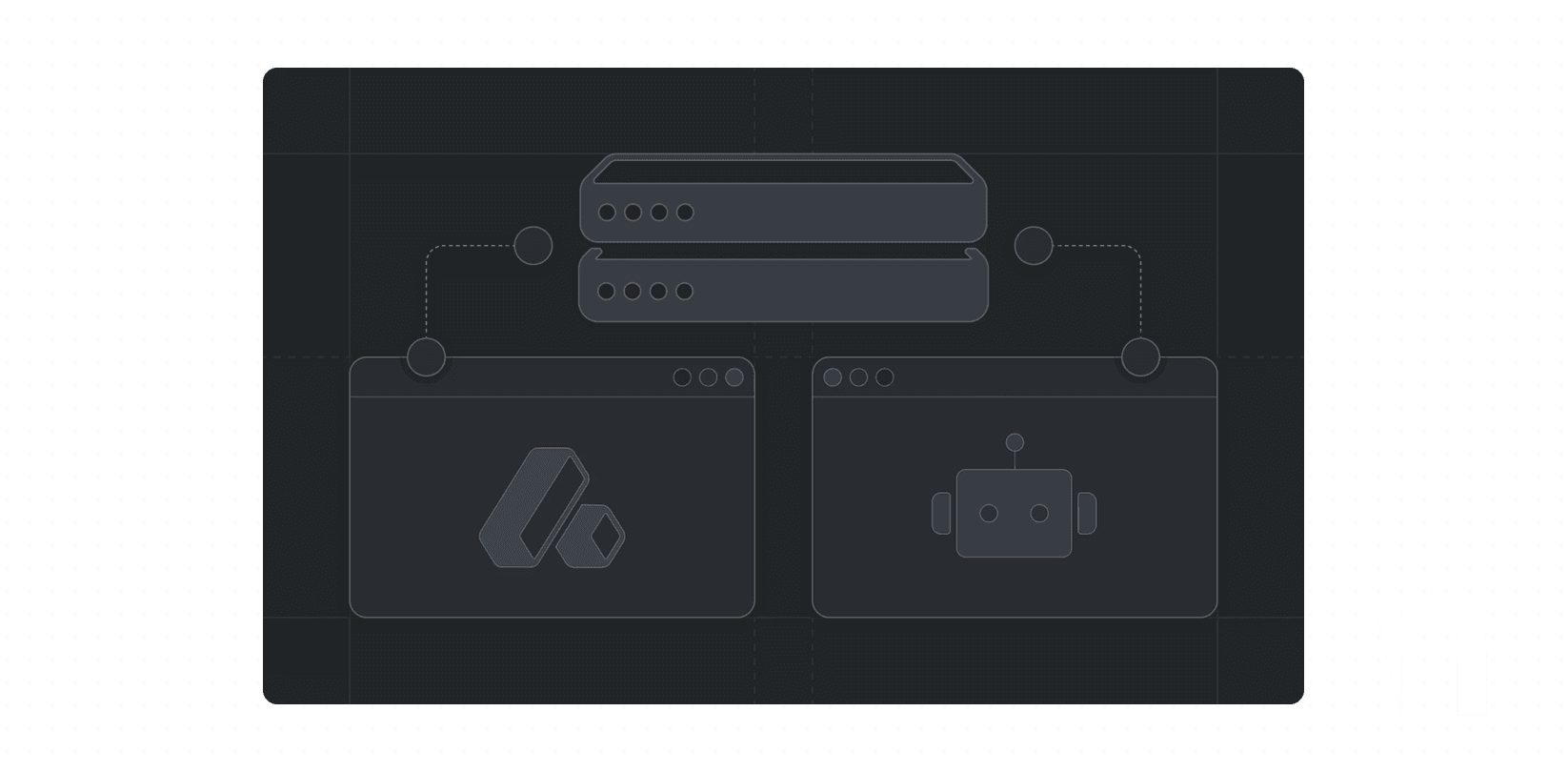
MCP: Definition and Minimum Architecture to Understand
The Model Context Protocol (MCP) is an open and open-source protocol enabling AI applications to connect to data sources and tools via a standardized interface.
The MCP specification defines communication based on JSON-RPC 2.0 and a host / client / server model:
The host is the AI application
The client is the connector within the AI application
The server exposes context and actions
Regarding transport, the MCP architecture documentation distinguishes between stdio (local servers) and Streamable HTTP (remote servers), with support for Server-Sent Events, and recommends robust authentication approaches including OAuth for token acquisition.
Security: Consent and User Control as Core Principles
The specification emphasizes security and “trust & safety” principles: explicit consent, user control over shared data and actions, caution around “tools” (which represent executable pathways), and clear UI authorization flows.
Where Attio MCP Fits Within This Architecture
Attio MCP is documented as a hosted MCP server providing secure access to the Attio workspace.
Attio communicated this server as a product release dated February 19, 2026, emphasizing the ability to “search, query and act” on data from “any MCP client.”
Key Features of Attio MCP
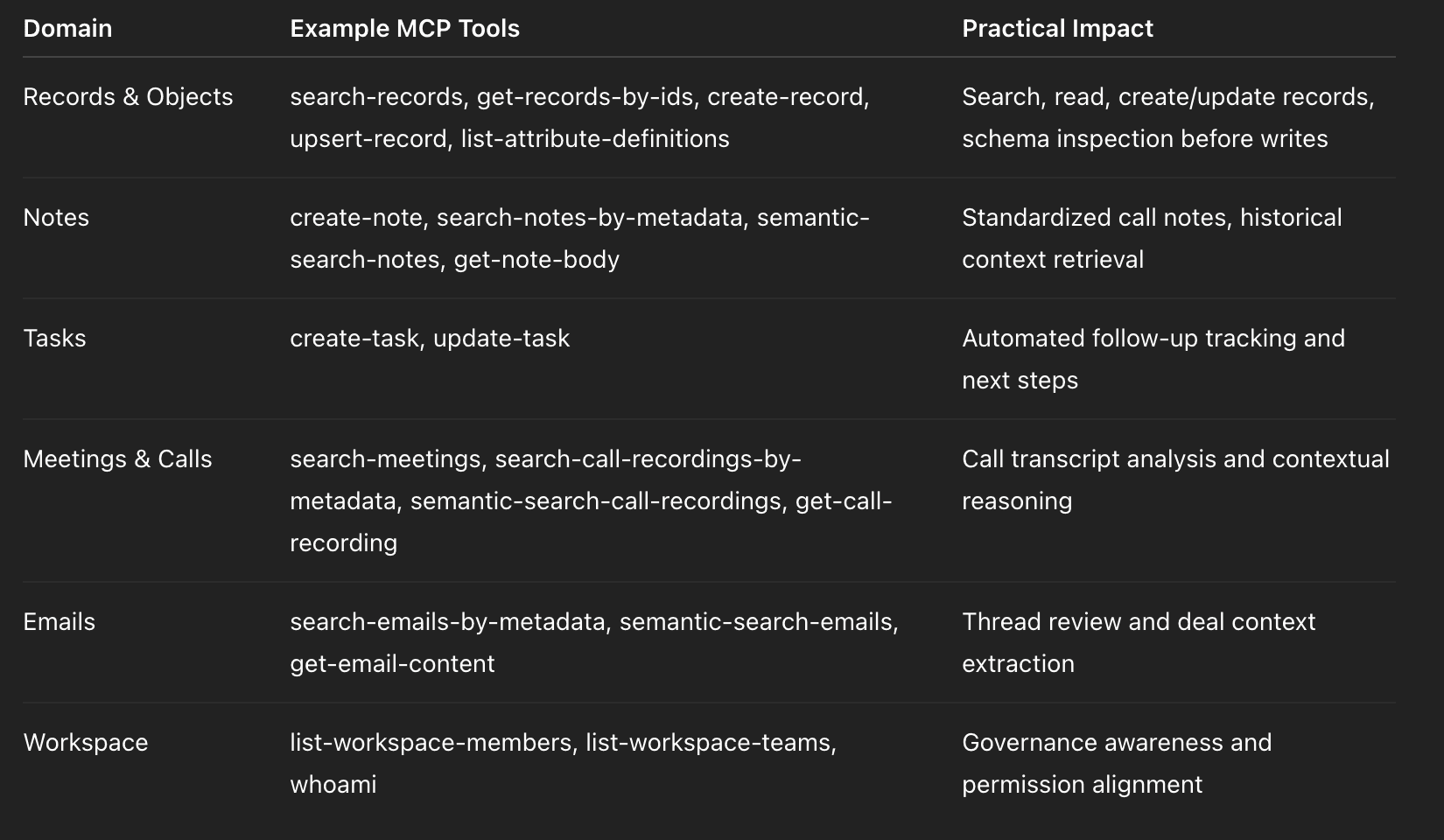
What the Agent Can Do (Tool Surface)
The Attio MCP documentation lists tool categories critical for agent-operable CRM: records/objects, notes, tasks, meetings & calls, emails, workspace.
Product Security: OAuth, Write Confirmations, Auditability
Attio MCP is described as “secure by design”: OAuth authentication (no API keys), reads auto-approved, writes requiring confirmation, access aligned with user permissions, and logged/auditable operations.
This aligns with MCP’s consent-based philosophy.
Operational Limitations to Anticipate
Attio indicates standard API limits apply per user for MCP usage (all tool calls combined), with specifics: semantic search latency, automatic pagination for bulk operations, write backoff mechanisms.
Use Cases, Integrations, and Pricing
Concrete Use Cases
Pipeline Review (Context-First)
A manager requests an overview of stalled deals with synthesis from notes, emails, and calls.
Combining search-records + semantic search across notes/emails/calls produces actionable analysis, and create-task converts recommendations into actions.
Call Summary & CRM Hygiene Automation
After a call, the agent retrieves the transcript (get-call-recording), writes a standardized note (create-note), and generates 2–4 tasks with deadlines (create-task).
One of the highest ROI use cases for CRM adoption.
Pricing Objection Mining
Semantic searches across notes, emails, and calls identify recurring objections (pricing, competition, clauses, budget).
Idempotent Enrichment via Upsert
The upsert-record tool supports idempotent updates (email/domain) to prevent duplication and maintain data consistency.
Integrations Around Attio MCP
MCP Clients
Attio cites compatible MCP AI clients including Claude (Desktop/claude.ai), ChatGPT, and Cursor, with connection via URL + OAuth.
Attio App Ecosystem
Email/calendar sync supported with Gmail/Google Calendar and Microsoft 365 Outlook/Outlook Calendar.
The App Store provides installation instructions via workspace settings.
No-Code Connection via Zapier
Attio integrates with Zapier to connect to “over six thousand tools and services” and orchestrate bidirectional flows.
Zapier also offers an “Attio MCP” interface generating a secure MCP URL for AI assistants.
Agent Authentication Infrastructure via Arcade.dev
Arcade.dev provides MCP-based authentication infrastructure for AI agents, managing OAuth, tokens, granular permissions, and read/write operations on Attio records.
Attio Pricing and Credit Model
Attio displays per-user pricing and distinguishes “seat credits” and “workspace credits.”
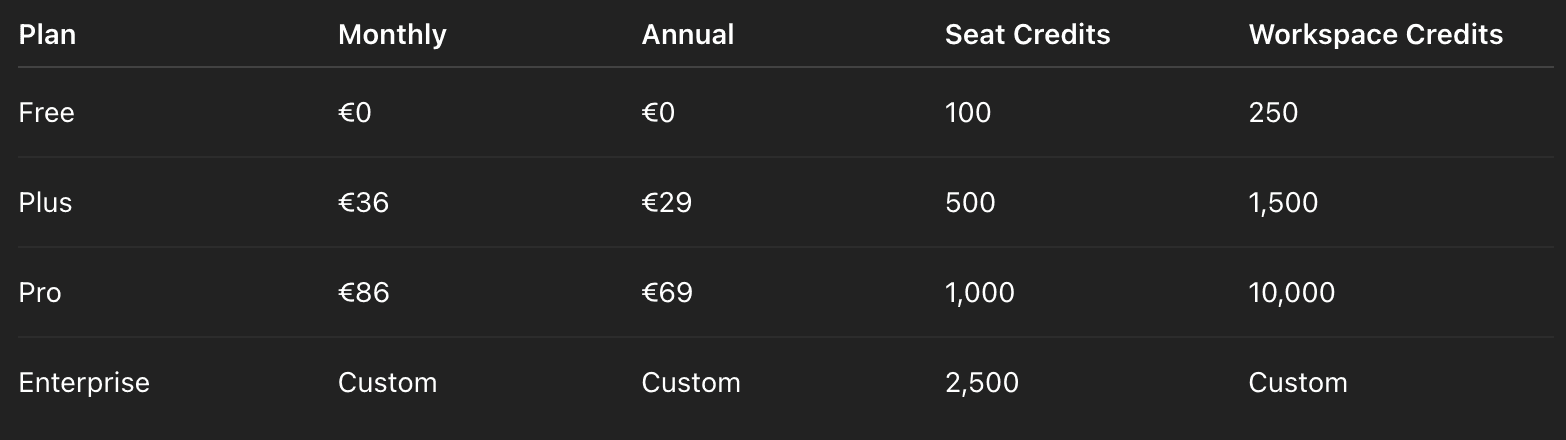
Additional workspace credits can be purchased (+5,000 / +10,000 / +25,000 / +50,000 tiers).
Seat credits are individual. Workspace credits are shared across workflows and AI features.
Critical Analysis and Comparison
Advantages
Standardized AI interoperability
Modern AI architecture alignment
Broad tool surface (records + notes + tasks + communications)
OAuth + confirmation guardrails
Limitations and Risks
Agents execute potentially powerful tools
Poor data governance amplifies errors
Schema inconsistency accelerates duplication
Rate limits require disciplined prompting
Comparative Table
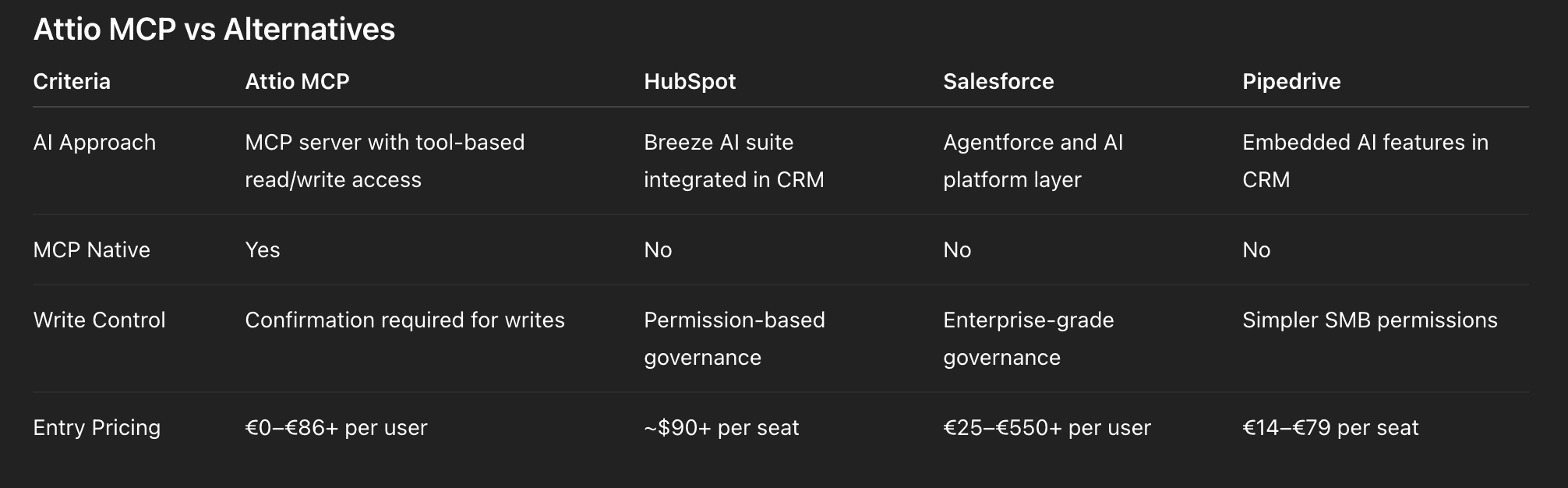
Recommendation: Who Should Adopt Attio MCP?
Attio MCP is highly relevant for GTM teams transitioning from “data entry CRM” to “execution CRM,” transforming notes, tasks, searches, and updates into prompt-driven actions with guardrails.
It is also well suited when connecting multiple AI environments (assistants, IDE agents, automation systems) to a single source of truth, as MCP standardizes context and action exchange.
If governance is weak (unstable naming, no deduplication logic), normalization must precede MCP deployment.
Implementation
Deployment Flow (Mermaid)
Operational Checklist (RevOps & Security)
Scope: 2–3 workflows only
CRM Model: define conventions & upsert rules
Connection: https://mcp.attio.com/mcp + OAuth
Guardrails: define write confirmation policy
Communications: align email/calendar sync policies
Performance: avoid bulk overuse & parallel calls
AI TCO: monitor seat/workspace credits
FAQ
What is Attio MCP?
Attio’s hosted MCP server enabling secure AI access to CRM data and actions.
What does MCP stand for?
Model Context Protocol.
Which URL should I use?
https://mcp.attio.com/mcp
Does it require an API key?
No. OAuth-based authentication.
Can the agent modify my CRM?
Yes, but writes require confirmation.
Is it included in all plans?
See pricing page for plan availability.
What is the difference between Attio MCP and Attio Documentation MCP?
Attio also provides an MCP server for documentation (https://docs.attio.com/mcp) separate from the workspace MCP server.